Hiding Scrollbars
Scrollbars can be a source of flakiness in visual tests — they can randomly appear, disappear and change their position. We strongly recommend hiding them if you perform visual checks.
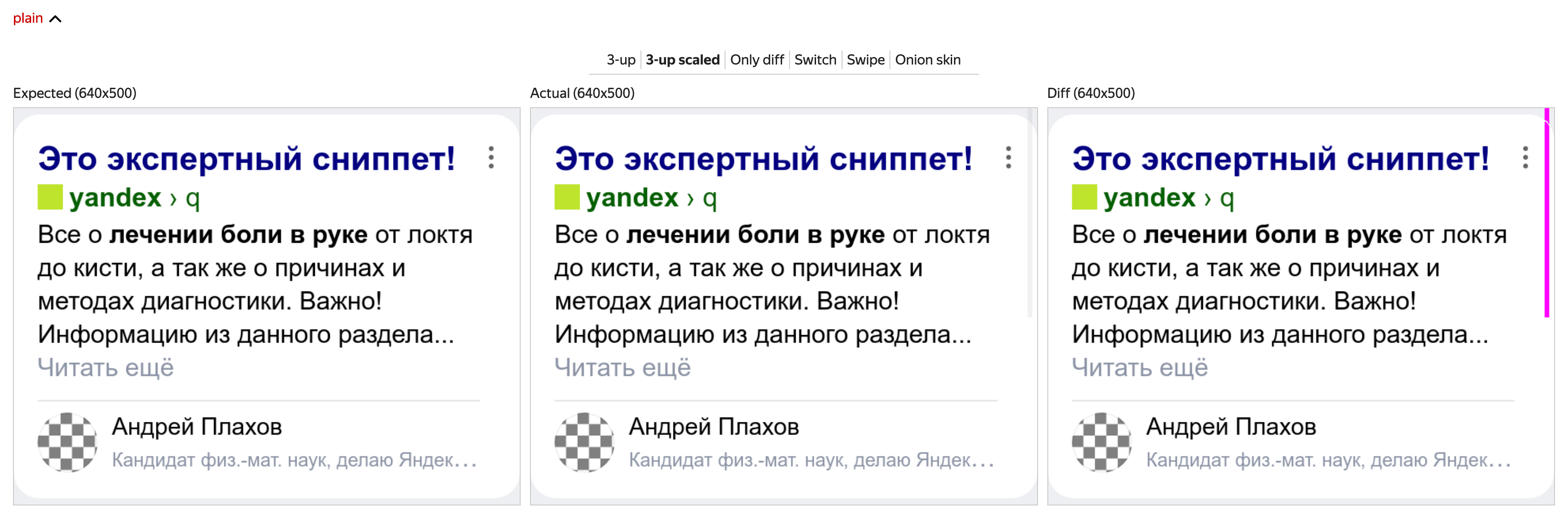
Example of a diff due to scrollbar:
Solution 1: Using the --hide-scrollbars flag (recommended)
Chrome, starting from around version 50 (and likely other Chromium-based browsers) supports the --hide-scrollbars flag. You can specify it in the browser settings like this:
module.exports = {
    browsers: {
        chrome: {
            desiredCapabilities: {
                browserName: "chrome",
                browserVersion: "125.0",
                "goog:chromeOptions": {
                    args: ["--hide-scrollbars"],
                },
            },
        },
    },
};
Solution 2: screenshotDelay
If the browser you are using doesn't support the --hide-scrollbars flag, you can use the screenshotDelay option to wait until the scrollbar disappears or becomes stable.
In Testplane settings, there is a mandatory option browsers that specifies the set of browsers available in the project and their properties. Select the browser where you are experiencing diffs due to scrollbars and add the screenshotDelay option for it:
module.exports = {
    browsers: {
        iphone: {
            screenshotDelay: 600, // Delay before taking a screenshot in ms

            // other browser settings...
        },

        // other browsers...
    },

    // other Testplane settings...
};
The screenshotDelay option sets a pause in milliseconds that Testplane should wait before taking a screenshot (before executing the assertView command).
How can it help?
Often screenshots generate diffs because the test needs to scroll the page to the required element just before taking the screenshot. After the scroll is performed, the scrollbar might still be visible on the screen for some time and thus, might appear in the screenshot if taken immediately. The screenshotDelay gives the scrollbar time to disappear.
However, this method does not always work as it depends on the implementation and behavior of the browsers.
Solution 3: Disabling Scrollbars using CDP
This solution is useful for very old Chrome versions or browsers that do not support the --hide-scrollbars flag, but do support the Emulation.setScrollbarsHidden CDP method.
If scrollbars appear in screenshots in the Chrome browser, they can be disabled using the DevTools protocol.
To do this, add the hermione-hide-scrollbars plugin to your project and specify in its settings the list of browsers for which you want to disable scrollbars in the tests.
Update the Chrome browser to version 72.1 or higher for this functionality to work in your tests. Earlier versions of Chrome do not support the Emulation.setScrollbarsHidden command, which is used to disable the scrollbars.
The hermione-hide-scrollbars plugin is based on the Emulation.setScrollbarsHidden CDP method, so alternatively you can do it yourself:
it("should hide scrollbar", async function ({ browser }) {
    // Get puppeteer instance
    const puppeteer = await browser.getPuppeteer();

    // Get the first open page (considering it to be currently active)
    const [page] = await puppeteer.pages();

    // Create a CDP session
    const client = await page.target().createCDPSession();

    // Hide the scrollbar
    await client.send("Emulation.setScrollbarsHidden", { hidden: true });

    await browser.url("https://yandex.ru");
});
Keywords
- screenshotDelay
- hermione-hide-scrollbars