Accepting Screenshots in CI
Overview
The static image accepter lets reviewers accept new screenshot baselines from a static HTML report that was published by CI (for example, on S3 or behind an internal web server). This is what it looks like:
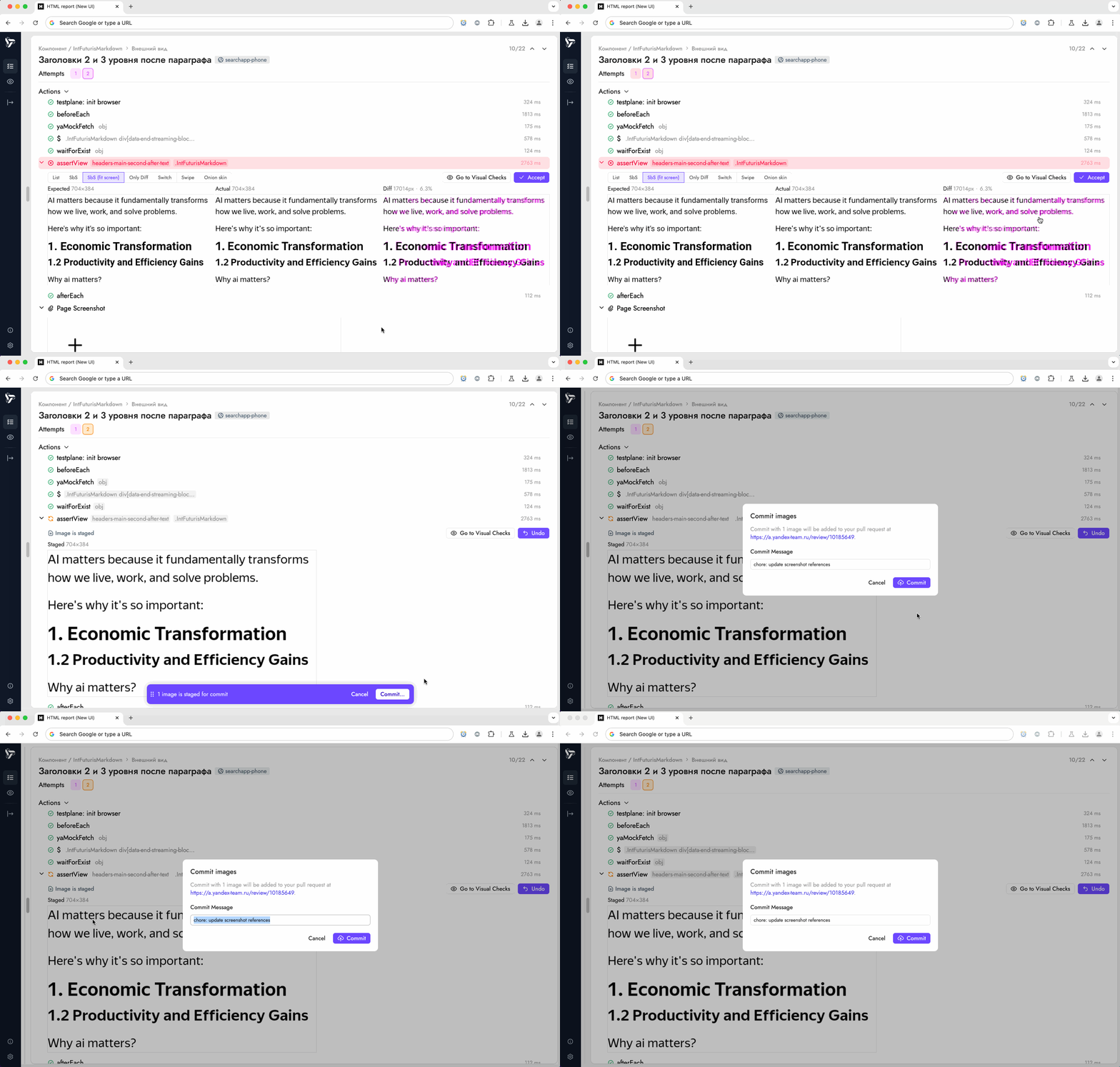
Static accepter UI looks very similar to GUI mode — you can accept screenshots in both, and that's by design. The main difference is that you can't launch GUI in CI, but you can use static accepter feature to save time when accepting screenshots — you no longer need to spend time on updating screenshots locally and re-uploading them to your PR.
A typical flow may look as follows:
- A CI job finishes running tests, generates the html-reporter bundle, and uploads the static report somewhere reviewers can reach it.
- A reviewer opens that static report, stages the screenshots that should become the new baselines, and presses Commit.
- html-reporter sends the staged screenshots through the configured accepter: either the legacy HTTP service that you operate, or a runtime ESM module such as Static Accepter v2.
The static accepter is disabled in GUI mode. To expose it in the static bundle you must configure repository and pull request URLs plus either the legacy service or a v2 module, as shown below.
Configuration prerequisites
Add the staticImageAccepter block to the reporter configuration used when building the static report:
plugins: {
    'html-reporter/testplane': {
        enabled: true,
        // ...other reporter options
        staticImageAccepter: {
            enabled: true,
            repositoryUrl: 'https://github.com/org/project',
            pullRequestUrl: 'https://github.com/org/project/pull/42',
            serviceUrl: 'https://accepter.example.com/static-accepter',
            meta: {
                ciRunId: process.env.GITHUB_RUN_ID,
                // any other contextual data required by your service
            },
            axiosRequestOptions: {
                timeout: 120000
            }
        }
    }
}
- The accepter is ignored unless the
enabledflag is set and the report is opened in static mode.repositoryUrlandpullRequestUrlare always mandatory. ConfigureserviceUrlfor the legacy HTTP flow ormoduleUrlfor Static Accepter v2; whenmoduleUrlis present, it takes precedence andserviceUrlis not required. - Images collected for committing always reference the stored baseline path. The accepter throws if the underlying tool cannot provide a
refImg.relativePath, because the service needs the final repository-relative destination for each file. axiosRequestOptions(optional) are forwarded to the HTTP client used by the report UI so you can tweak timeouts, headers, or authentication parameters required by your service.
Static Accepter v2
Static Accepter v2 delegates downloading, batching, authenticated commit creation, and final Submit/Suggest confirmation to a runtime ESM module. To enable the production client, set moduleUrl in the existing configuration block:
plugins: {
    'html-reporter/testplane': {
        enabled: true,
        staticImageAccepter: {
            enabled: true,
            repositoryUrl: 'https://github.com/org/project',
            pullRequestUrl: 'https://github.com/org/project/pull/42',
            moduleUrl: 'https://my-static-accepter-service.com/v2/script.js',
        }
    }
}
The module is imported by the report page at runtime and is not included in the html-reporter bundle. Opening the commit dialog starts the import; the final Commit button remains disabled until it succeeds. The final click calls the module synchronously so the browser preserves user activation for the static accepter v2 popup.
The popup owns confirmation and all static accepter API requests. html-reporter does not embed an iframe, open the popup itself, send protocol messages, split commits, or call static accepter /_api/v2/* endpoints. While the operation is pending, the report shows download/commit/confirmation/submit progress and keeps the staged set unchanged. submitted and suggested results mark the staged images as committed; cancellation or an error leaves them staged for retry.
Before publishing a report with v2, verify the following browser integration requirements:
- The exact report origin is allowed by static accepter.
- The report CSP permits the
moduleUrlorigin inscript-srcand permits screenshot origins inconnect-src. - Screenshot origins return CORS headers that allow the report origin.
- The report does not use
Cross-Origin-Opener-Policy: same-origin, because static accepter requireswindow.openerfor its popup protocol. - Reviewers are authenticated in static accepter, have access to the pull request, and allow popups for the report origin.
If moduleUrl is omitted, html-reporter preserves the legacy HTTP behavior described below.
Legacy HTTP workflow
- Reviewers browse the static report, stage the screenshots they want to promote, and open the Commit dialog.
- html-reporter gathers the staged entries, fetches the binary data for each actual image, and builds a
multipart/form-datapayload that includes repository metadata, the chosen commit message, and every image file. - The payload is sent as an HTTP
POSTrequest to the configuredserviceUrl. Upload progress is exposed in the UI so reviewers can monitor large batches. - Your accepter service performs authentication, verifies the request, stores the uploaded screenshots, and updates the PR branch (for example by creating a commit or opening a follow-up PR). It runs persistently so it can be reused across reports and CI runs.
- On any HTTP status between 200 (inclusive) and 400 (exclusive) the UI treats the operation as successful, marks images as committed, stores their identifiers in local storage to avoid duplicate work, and shows a success notification. Non-2xx responses bubble up as errors in the UI.
HTTP API contract
The html-reporter always sends a single HTTP POST request to staticImageAccepter.serviceUrl. The request body is multipart/form-data.
Form fields
| Field name | Type | Description |
|---|---|---|
repositoryUrl | text part | Full URL of the Git repository that contains the baselines (usually the PR target repository). |
pullRequestUrl | text part | Full URL of the PR that should receive the commit. Use it to discover branch/owner information inside your service. |
message | text part | Commit message chosen by the reviewer. Defaults to chore: update <tool> screenshot references if left unchanged. |
meta | text part (optional) | Arbitrary JSON string produced from the configured staticImageAccepter.meta object. Use it to pass CI context (run IDs, actor, custom flags). |
image | file part (repeated) | Each staged screenshot is uploaded as a binary file. The browser fetches the actual image blob and attaches it with the filename set to the repository-relative destination path (for example test/screens/page/diff.png). |
Request semantics
- Multiple
imageparts are added in parallel (up to 256 concurrent downloads) before the request is dispatched. Order is not guaranteed, so the server should rely onfile.originalname(or equivalent) rather than the upload order. - Each image corresponds to an
actualscreenshot that is meant to replace therefbaseline located at the given relative path. Your server is responsible for writing the file content to that path within the repository checkout or storage backend. - The client does not send a structured list of images in the body — the file parts themselves are authoritative. Use the multipart metadata to reconstruct the commit.
- Authentication, authorization, and CSRF protections are entirely up to your implementation. Supply any additional headers through
axiosRequestOptions(for example, bearer tokens) if you want the report to authenticate against the service.
Response expectations
- Any HTTP status in the range
[200, 400)is treated as success. You may return a body (for example JSON with links to created commits), but the UI does not require it. - Any other status or thrown error results in a failure notification for the reviewer. Include descriptive error messages in the response body to simplify troubleshooting.
Implementation options
Your accepter service can update pull requests either under the reviewer’s identity or under an automation account. The two patterns below illustrate both extremes. Feel free to adapt them to your stack as long as the HTTP contract remains the same.
Option A: GitHub App with reviewer login (commits authored by humans)
To keep commits attributed to the reviewer who pressed Commit, combine a GitHub App installation (for repository access) with the App’s OAuth flow (to obtain a user token). Reviewers sign in to the service once, the server stores a session tied to their GitHub user, and future accepter requests run git commands using their user-to-server token. GitHub records the resulting commit under that reviewer’s identity.
GitHub setup required beforehand
- Create a GitHub App (Settings → Developer settings → GitHub Apps) with the repository permissions
Contents: Read & WriteandPull requests: Read. Enable User authorization callback URL and Request user authorization (OAuth). Request theuser:emailscope so the service can look up the reviewer’s primary email for commit attribution. Webhooks are not necessary. - Generate a private key for the App and store the PEM string securely. Also note the App’s Client ID and Client secret—they are used during the OAuth handshake.
- Install the App on every repository that should accept screenshots. Only organization/repository admins can complete the installation step.
With this configuration in place, the service performs two authentication steps:
- During login, it exchanges the OAuth
codefor a user token and stores it in a session cookie so later uploads run as that reviewer. - During each accepter request, it determines which installation covers the target repository, clones the PR branch, and uses the reviewer’s user token in the Git remote URL. GitHub attributes the resulting commit to the reviewer.
Below is a minimal Express implementation that runs persistently on your infrastructure (for example, in Kubernetes or on a small VM). It exposes a login route for reviewers, persists user tokens in memory (replace this with durable encrypted storage for production), receives the multipart payload from html-reporter, and pushes the new baselines as the signed-in user.
TypeScript example: GitHub App + OAuth login
// server.ts
import express from "express";
import multer from "multer";
import cookieParser from "cookie-parser";
import path from "path";
import os from "os";
import fs from "fs/promises";
import { randomUUID } from "crypto";
import simpleGit from "simple-git";
import { Octokit } from "octokit";
import { createAppAuth } from "@octokit/auth-app";

const upload = multer({ storage: multer.memoryStorage() });

const appId = process.env.GITHUB_APP_ID!;
const privateKey = process.env.GITHUB_APP_PRIVATE_KEY!; // PEM string
const clientId = process.env.GITHUB_APP_CLIENT_ID!;
const clientSecret = process.env.GITHUB_APP_CLIENT_SECRET!;
const sessionSecret = process.env.SESSION_SECRET!;

type Session = { token: string; login: string; name: string; email: string };
const sessions = new Map<string, Session>();
const pendingStates = new Set<string>();

const app = express();
app.use(cookieParser(sessionSecret));

app.get("/auth/login", (_req, res) => {
    const state = randomUUID();
    pendingStates.add(state);
    const authorizeUrl = new URL("https://github.com/login/oauth/authorize");
    authorizeUrl.searchParams.set("client_id", clientId);
    authorizeUrl.searchParams.set("redirect_uri", `${process.env.PUBLIC_URL}/auth/callback`);
    authorizeUrl.searchParams.set("state", state);
    authorizeUrl.searchParams.set("scope", "repo user:email");
    res.redirect(authorizeUrl.toString());
});

app.get("/auth/callback", async (req, res) => {
    const { code, state } = req.query;
    if (typeof code !== "string" || typeof state !== "string") {
        res.status(400).send("Missing OAuth parameters");
        return;
    }

    if (!pendingStates.has(state)) {
        res.status(400).send("Unknown OAuth state");
        return;
    }

    const auth = createAppAuth({ appId, privateKey, clientId, clientSecret });
    const oauth = await auth({ type: "oauth-user", code });
    const userOctokit = new Octokit({ auth: oauth.token });
    const { data: viewer } = await userOctokit.rest.users.getAuthenticated();
    const { data: emails } = await userOctokit.rest.users.listEmailsForAuthenticatedUser();
    const primaryEmail = emails.find(item => item.primary && item.verified)?.email;

    const sessionId = randomUUID();
    sessions.set(sessionId, {
        token: oauth.token,
        login: viewer.login,
        name: viewer.name ?? viewer.login,
        email: primaryEmail ?? `${viewer.id}+noreply@users.noreply.github.com`,
    });

    res.cookie("accepter_session", sessionId, { httpOnly: true, sameSite: "lax", secure: true });
    pendingStates.delete(state);
    res.send("Authenticated. You can return to the static report and retry the commit.");
});

app.post("/static-accepter", upload.any(), async (req, res) => {
    const sessionId = req.cookies?.accepter_session;
    const session = sessions.get(sessionId ?? "");
    if (!session?.token) {
        res.status(401).send("Please authenticate at /auth/login before committing screenshots.");
        return;
    }

    const repositoryUrl = req.body.repositoryUrl as string;
    const pullRequestUrl = req.body.pullRequestUrl as string;
    const message = (req.body.message as string) || "chore: update baselines";

    if (!repositoryUrl || !pullRequestUrl) {
        res.status(400).send("Missing repositoryUrl or pullRequestUrl");
        return;
    }

    if (!req.files?.length) {
        res.status(400).send("No images provided");
        return;
    }

    const { owner, repo } = parseRepository(repositoryUrl);

    const appOctokit = new Octokit({
        authStrategy: createAppAuth,
        auth: { appId, privateKey },
    });

    const installation = await appOctokit.rest.apps.getRepoInstallation({ owner, repo });
    const installationOctokit = new Octokit({
        authStrategy: createAppAuth,
        auth: {
            appId,
            privateKey,
            installationId: installation.data.id,
        },
    });

    const prNumber = extractPullNumber(pullRequestUrl);
    const { data: pull } = await installationOctokit.rest.pulls.get({
        owner,
        repo,
        pull_number: prNumber,
    });
    const branch = pull.head.ref;

    const remote = `https://${session.login}:${session.token}@github.com/${owner}/${repo}.git`;

    const worktree = await fs.mkdtemp(path.join(os.tmpdir(), `accepter-${randomUUID()}-`));
    const git = simpleGit();

    try {
        await git.clone(remote, worktree, ["--single-branch", "--branch", branch]);
        const branchGit = simpleGit(worktree);

        for (const file of req.files as Express.Multer.File[]) {
            const destination = path.join(worktree, file.originalname);
            await fs.mkdir(path.dirname(destination), { recursive: true });
            await fs.writeFile(destination, file.buffer);
        }

        await branchGit.add(".");
        await branchGit.commit(message, undefined, {
            "--author": `${session.name} <${session.email}>`,
        });
        await branchGit.push("origin", branch);

        res.status(204).end();
    } catch (err) {
        console.error(err);
        res.status(500).send("Failed to update pull request");
    } finally {
        await fs.rm(worktree, { recursive: true, force: true });
    }
});

function parseRepository(repositoryUrl: string) {
    const match = repositoryUrl.match(/github\.com\/(.+?)\/(.+?)(\.git)?$/);
    if (!match) {
        throw new Error(`Unsupported repository URL: ${repositoryUrl}`);
    }
    return { owner: match[1], repo: match[2] };
}

function extractPullNumber(pullRequestUrl: string) {
    const match = pullRequestUrl.match(/pull\/(\d+)/);
    if (!match) {
        throw new Error(`Unsupported pull request URL: ${pullRequestUrl}`);
    }
    return Number(match[1]);
}

const port = process.env.PORT ?? 3000;
app.listen(port, () => {
    console.log(`Static accepter listening on :${port}`);
});
Environment variables
GITHUB_APP_ID– the numeric App ID.GITHUB_APP_PRIVATE_KEY– the PEM-encoded private key generated for the App. Store it securely (for example in your secrets manager).GITHUB_APP_CLIENT_IDandGITHUB_APP_CLIENT_SECRET– credentials used for the OAuth user flow.SESSION_SECRET– random string for signing cookies. For production, back sessions with an encrypted database instead of the in-memoryMapshown here.PUBLIC_URL– HTTPS origin of the accepter service (for examplehttps://accepter.example.com).- Install the App in every repository that should accept screenshots. It needs the
Contents: Read & WriteandPull requests: Readpermissions requested above.
Option B: GitHub App without reviewer login (commits authored by a bot)
If you would rather avoid managing user sessions, the same GitHub App can push commits directly by using its installation token. This keeps the service stateless and easier to operate, but every commit will be authored by the App’s bot account.
Anyone who can reach the accepter endpoint can push to the repositories where the App is installed, so protect network access carefully (for example, by keeping the service on a trusted network or adding your own authentication layer).
The one-time GitHub setup is simpler than Option A: create an App with Contents: Read & Write and Pull requests: Read, generate the private key, and install it on the target repositories. No OAuth client ID/secret or login routes are required.
TypeScript example: GitHub App installation token only
// server.ts
import express from "express";
import multer from "multer";
import path from "path";
import os from "os";
import fs from "fs/promises";
import { randomUUID } from "crypto";
import simpleGit from "simple-git";
import { Octokit } from "octokit";
import { createAppAuth } from "@octokit/auth-app";

const upload = multer({ storage: multer.memoryStorage() });

const appId = process.env.GITHUB_APP_ID!;
const privateKey = process.env.GITHUB_APP_PRIVATE_KEY!; // PEM string

const app = express();

app.post("/static-accepter", upload.any(), async (req, res) => {
    const repositoryUrl = req.body.repositoryUrl as string;
    const pullRequestUrl = req.body.pullRequestUrl as string;
    const message = (req.body.message as string) || "chore: update baselines";

    if (!repositoryUrl || !pullRequestUrl) {
        res.status(400).send("Missing repositoryUrl or pullRequestUrl");
        return;
    }

    if (!req.files?.length) {
        res.status(400).send("No images provided");
        return;
    }

    const { owner, repo } = parseRepository(repositoryUrl);

    const appOctokit = new Octokit({
        authStrategy: createAppAuth,
        auth: { appId, privateKey },
    });

    const installation = await appOctokit.rest.apps.getRepoInstallation({ owner, repo });
    const installationOctokit = new Octokit({
        authStrategy: createAppAuth,
        auth: {
            appId,
            privateKey,
            installationId: installation.data.id,
        },
    });

    const prNumber = extractPullNumber(pullRequestUrl);
    const { data: pull } = await installationOctokit.rest.pulls.get({
        owner,
        repo,
        pull_number: prNumber,
    });
    const branch = pull.head.ref;

    const tokenResponse = await installationOctokit.rest.apps.createInstallationAccessToken({
        installation_id: installation.data.id,
    });
    const remote = `https://x-access-token:${tokenResponse.data.token}@github.com/${owner}/${repo}.git`;

    const worktree = await fs.mkdtemp(path.join(os.tmpdir(), `accepter-${randomUUID()}-`));
    const git = simpleGit();

    try {
        await git.clone(remote, worktree, ["--single-branch", "--branch", branch]);
        const branchGit = simpleGit(worktree);

        for (const file of req.files as Express.Multer.File[]) {
            const destination = path.join(worktree, file.originalname);
            await fs.mkdir(path.dirname(destination), { recursive: true });
            await fs.writeFile(destination, file.buffer);
        }

        await branchGit.add(".");
        await branchGit.commit(message);
        await branchGit.push("origin", branch);

        res.status(204).end();
    } catch (err) {
        console.error(err);
        res.status(500).send("Failed to update pull request");
    } finally {
        await fs.rm(worktree, { recursive: true, force: true });
    }
});

function parseRepository(repositoryUrl: string) {
    const match = repositoryUrl.match(/github\.com\/(.+?)\/(.+?)(\.git)?$/);
    if (!match) {
        throw new Error(`Unsupported repository URL: ${repositoryUrl}`);
    }
    return { owner: match[1], repo: match[2] };
}

function extractPullNumber(pullRequestUrl: string) {
    const match = pullRequestUrl.match(/pull\/(\d+)/);
    if (!match) {
        throw new Error(`Unsupported pull request URL: ${pullRequestUrl}`);
    }
    return Number(match[1]);
}

const port = process.env.PORT ?? 3000;
app.listen(port, () => {
    console.log(`Static accepter listening on :${port}`);
});
Environment variables
GITHUB_APP_ID– the numeric App ID.GITHUB_APP_PRIVATE_KEY– the PEM-encoded private key generated for the App.- The App must be installed on each repository that will receive screenshots. Commits will appear under the App’s bot identity.
Example: Integrating with GitHub Actions
The accepter service is long-lived, but CI is still responsible for producing the static report and publishing it. The workflow below shows one possible setup:
jobs:
    visual-tests:
        runs-on: ubuntu-latest
        permissions:
            contents: read
            id-token: write
        steps:
            - uses: actions/checkout@v4
              with:
                  fetch-depth: 0
            - uses: actions/setup-node@v4
              with:
                  node-version: 20
            - run: npm ci
            - run: npx testplane --reporter=html-reporter --reporter-options path=testplane-report
            - name: Upload static report to S3
              uses: jakejarvis/s3-sync-action@v0.5.1
              with:
                  args: --delete
              env:
                  AWS_S3_BUCKET: ${{ secrets.AWS_S3_BUCKET }}
                  AWS_ACCESS_KEY_ID: ${{ secrets.AWS_ACCESS_KEY_ID }}
                  AWS_SECRET_ACCESS_KEY: ${{ secrets.AWS_SECRET_ACCESS_KEY }}
                  AWS_REGION: ${{ secrets.AWS_REGION }}
                  SOURCE_DIR: testplane-report
                  DEST_DIR: "testplane-reports/${{ github.run_id }}-${{ github.run_number }}-${{ github.run_attempt }}/"
            - name: Publish report URL
              run: |
                  echo "Report: https://reports.example.com/testplane-reports/${{ github.run_id }}-${{ github.run_number }}-${{ github.run_attempt }}/index.html" >> "$GITHUB_STEP_SUMMARY"
Reviewers open the published report. Before committing for the first time they sign in to your accepter service (for example by visiting /auth/login). When they approve new baselines, the static accepter UI POSTs the images to your persistent service. That service validates the reviewer session, exchanges their GitHub App OAuth grant for a user token, and pushes the commit back to the PR branch under that reviewer’s identity.
By implementing this contract you can let reviewers approve new baselines directly from static html-reporter builds while keeping full control over how screenshots are promoted inside your CI/CD system.