How to Use Chrome DevTools Protocol in Testplane
Introduction
Install Hermione (Testplane) version 4 or higher in your project to use Chrome DevTools Protocol (CDP) in Testplane tests.
The WebDriver protocol has been used in Testplane for a long time, but the possibility of using CDP appeared only after migrating to WebdriverIO@7 in Hermione version 4.
CDP support in WebdriverIO@7 is implemented using puppeteer, which is a wrapper with a convenient API over CDP.
For a comparison of the WebDriver and CDP protocols, see the "WebDriver vs CDP" section in the Reference Manual.
Local Usage
Starting from Testplane 9, the value "devtools" for the automationProtocol option (as well as the --devtools CLI flag) has been removed. It caused a number of hard-to-reproduce errors that never occurred with automationProtocol: "webdriver", and the underlying WebdriverIO — on which Testplane is based — has also dropped its devtools automation protocol. The only supported value is now "webdriver" (which is also the default).
Note that this does not deprecate the Chrome DevTools Protocol itself: you can still use CDP directly (see the Remote Usage section below and the rest of this page). Only the devtools automation protocol provided by WebdriverIO has been removed.
To run your tests in a locally installed browser, use gridUrl: "local" (or the --local CLI flag) — Testplane will automatically download the required browsers and drivers and launch them via WebDriver:
// .testplane.conf.js

module.exports = {
    browsers: {
        chrome: {
            gridUrl: "local",
            desiredCapabilities: {
                browserName: "chrome",
                // ...
            },
        },

        // other browser settings...
    },

    // other Testplane settings...
};
After this, all subsequent runs will be performed in your locally installed Chrome.
If you need to launch tests on a local browser just once, you can pass the --local CLI option instead:
npx testplane ... --local
See the Running on Local Browsers blog post for a step-by-step guide.
Once the browser is started locally via WebDriver, you can still call CDP commands inside the test as described in the Remote Usage section.
Remote Usage
When using CDP on a remote machine (e.g., in a grid), Testplane will first start the browser using the WebDriver protocol and then, upon user request (i.e., when calling a CDP command), switch to CDP connection. Thus, in a single test scenario with a remote browser, we will interact using both protocols.
It looks something like this:
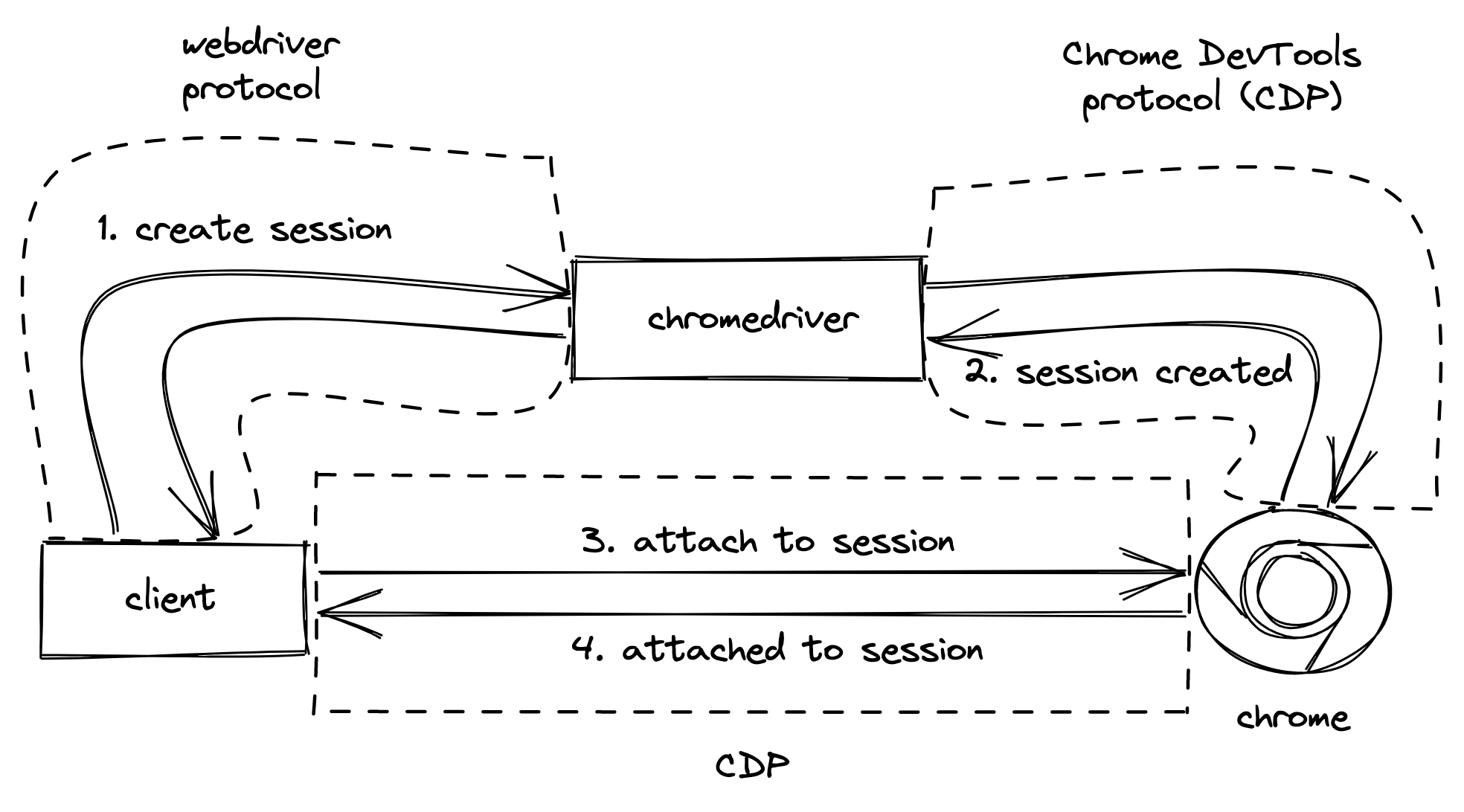
To connect to a remote browser via CDP, you need to:
- use
automationProtocol: webdriver(default value); - add the vendor-specific field
selenoid:optionsin the browser’sdesiredCapabilities: this option is necessary for webdriverio to understand that it needs to connect to a remote machine instead of a local browser.
// .testplane.conf.js

module.exports = {
    browsers: {
        chrome: {
            desiredCapabilities: {
                "selenoid:options": {},
                // ...
            },

            // other browser settings...
        },

        // other browser settings...
    },

    // other Testplane settings...
};
Full CDP usage is only supported from Chrome@77 and higher. This is due to the internal implementation in webdriverio.
What Capabilities Does CDP Provide
With CDP, you can:
- track and intercept network requests and responses
- test page accessibility
- manage network bandwidth
- control CPU performance
- hide scrollbars